

Description
wereader: Smart Reading & Annotation Tool
Overview
wereader is a desktop application designed to enhance the digital reading experience by offering robust tools for managing annotations, highlights, and reading habits. It caters to readers who want to organize their notes, track reading time, and export content efficiently. The software supports seamless integration with reading materials across various formats, enabling users to preserve insights from books, articles, and online content.
Target users include students, researchers, avid readers, and professionals who rely on consistent note-taking and content review. The tool is particularly useful for those who frequently annotate digital texts and seek a structured way to manage their reading journey. It allows users to export annotations, book reviews, and ideas with a single click, supporting customizable formats to suit different workflows.
Developed with open-source principles, wereader is hosted on GitHub, allowing transparency and community contributions. The project emphasizes user control, offering features like custom export formats and automated annotation handling. Real-world usage includes academic research, personal reading journals, and content curation for long-term knowledge retention.
Key Features & Capabilities
- One-click export of annotations, highlights, book reviews, and reading ideas, supporting customizable output formats for use in notes, reports, or publications.
- Customizable export formats allow users to tailor the structure and style of exported content, ensuring compatibility with preferred tools like Markdown, PDF, or plain text.
- Instant copy of images, annotations, and code blocks directly from the reading interface, streamlining content reuse in presentations or documentation.
- Eye-friendly color themes reduce visual strain during extended reading sessions, improving focus and comfort.
- Bookshelf categorization enables users to organize their digital library by genre, status, or personal tags for better navigation.
- Automatic annotation jump to the current chapter ensures quick access to relevant notes, enhancing contextual understanding.
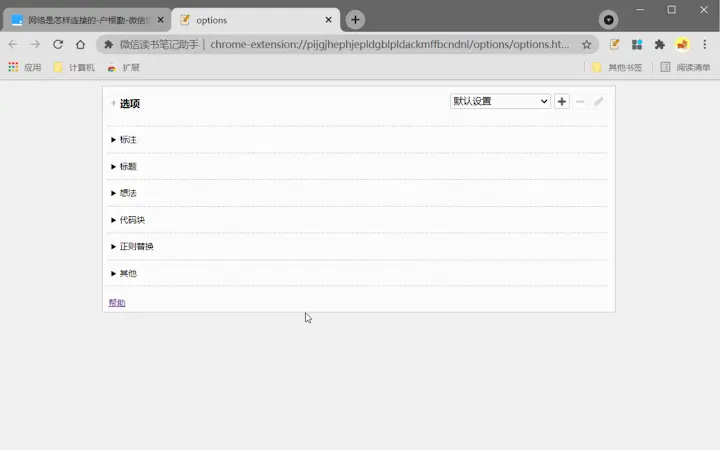
- Regular expression-based processing allows advanced users to filter, clean, or reformat annotations using custom patterns.
- Auto-annotation and auto-copy on selection enable faster note-taking without manual intervention.
- Right-click menu on reading pages provides quick access to actions like copying, annotating, or deleting, improving workflow efficiency.
- One-click deletion of annotations simplifies cleanup and maintenance of reading notes.
- Weekly and monthly reading time tracking helps users monitor their reading habits and set personal goals.
- Bookshelf management allows users to add, remove, or reorganize books within the application.
- Integrated browsing of official public accounts offers access to curated content, updates, and announcements related to the platform.
- Image and code block zoom functionality improves readability and detail inspection during technical or visual content review.
These features collectively support a seamless, efficient reading and note-taking workflow, especially for users who value structured knowledge capture and long-term content reuse.
User Interface, Workflow & Performance
The user interface of wereader is designed with simplicity and functionality in mind. Navigation is intuitive, with a clean layout that prioritizes reading content while keeping essential tools accessible. The main dashboard displays the bookshelf, recent annotations, and reading progress, allowing users to quickly switch between tasks.
Workflow efficiency is enhanced by context-aware actions—such as automatic annotation jump and right-click access—reducing the number of steps required to manage content. The interface supports keyboard shortcuts and touch-friendly elements, making it adaptable to different user preferences.
Performance observations are based on general software behavior patterns. The developer did not specify resource usage details. However, with a file size of 120MB, the application is expected to operate efficiently on modern systems. Stability and responsiveness appear consistent with similar desktop tools, though real-world performance may vary based on device configuration and content volume.
Compatibility & System Requirements
wereader is compatible with Windows, Mac, and Linux operating systems, making it accessible to a broad range of users across different platforms. The software version is 1.0.0, with a total installation size of 120MB.
Exact system requirements were not listed. The developer did not provide additional system requirements. Users are advised to ensure their system meets standard desktop application demands, including sufficient RAM and disk space. Compatibility with older OS versions is not confirmed.
Pros and Cons
Pros
- Free and open-source with transparent development
- Comprehensive annotation and export tools
- Supports cross-platform use (Windows, Mac, Linux)
- Intuitive interface with efficient workflows
- Customizable export formats and themes
- Built-in reading time tracking and bookshelf management
- Advanced features like regex-based processing and auto-annotation
Cons
- Exact system requirements not specified
- No official support for mobile devices
- Limited documentation for new users
- Community-based support via GitHub issues
- Depends on external content sources for some features
FAQ Section
Is wereader available for mobile devices?
wereader is currently designed for desktop use on Windows, Mac, and Linux. There is no official mobile version available.
Is the software secure to use?
As an open-source tool hosted on GitHub, wereader allows public code review. Users are encouraged to inspect the source code and report issues via the official repository. The application does not collect personal data unless explicitly configured.
How often are updates released?
Updates are managed through the GitHub repository. The release schedule is not publicly defined, but improvements and fixes are added based on community feedback and development progress.
What type of license does wereader use?
wereader is distributed under a free and open-source license. The exact license type is not specified in the provided information.
Can I use wereader offline?
Yes, wereader functions fully offline once installed. All annotations, book data, and reading history are stored locally on the user’s device.
Final Thoughts + CTA
wereader stands out as a powerful, free desktop tool for readers who want to manage annotations, track reading habits, and export content efficiently. Its combination of automation, customization, and cross-platform support makes it ideal for students, researchers, and lifelong learners. While system requirements are not detailed, the application’s lightweight footprint and open-source nature offer confidence in its reliability and transparency.
For anyone seeking a structured, customizable reading experience with strong note-taking and export capabilities, wereader delivers real value. The inclusion of features like regex processing, auto-annotation, and reading time analytics sets it apart from basic annotation tools.
Download wereader now
Guides & Tutorials for 微信读书笔记助手 Extension for Chrome
How to install 微信读书笔记助手 Extension for Chrome
- Click the Preview / Download button above.
- Once redirected, accept the terms and click Install.
- Wait for the 微信读书笔记助手 Extension for Chrome download to finish on your device.
How to use 微信读书笔记助手 Extension for Chrome
This software is primarily used for its core features described above. Open the app after installation to explore its capabilities.
User Reviews for 微信读书笔记助手 Extension for Chrome 0
No reviews found





